Insydor - AI Insights Inside, Better Decisions Ahead
Get insider-level insightsFor smarter product selection
INSYDOR helps Takealot sellers evaluate listings, categories, and reviews with on-page analytics and AI-powered insights.
Start with free usage
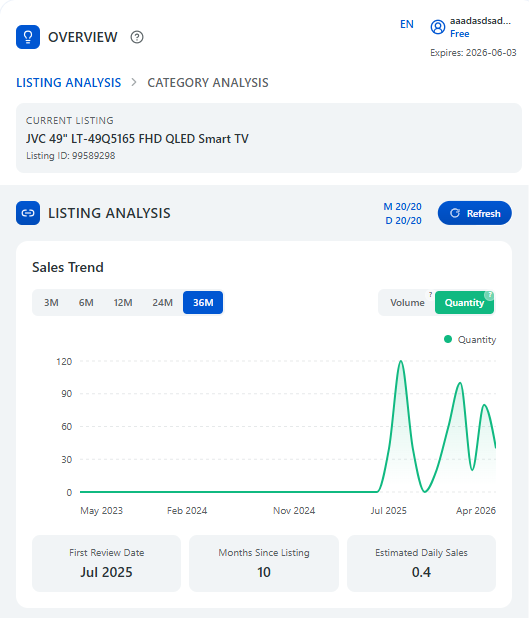
Sales trends, volume and quantity, estimated daily sales, first review date
Capability map
Turn listing, review, and category insights into better product decisions. Seller and brand intelligence is coming later.
Listing analytics
Track sales trends, volume and quantity, months since listing, and estimated daily sales to assess lifecycle and follow-sell potential.
AI review insights
Summarize pros and cons, themes, buyer scenarios, and improvement ideas from customer reviews.
Category analytics
Analyze category volume and quantity trends, price bands, and top sellers, brands, and listings to find entry opportunities.
Seller analytics
Analyze top sellers by sales, trends, share, and product focus to understand what works.
Brand analytics
Compare top brands by sales, trends, share, and positioning to identify market opportunities.
Real outputs
Not a concept deck—what the extension renders on Takealot today.
Sales trend
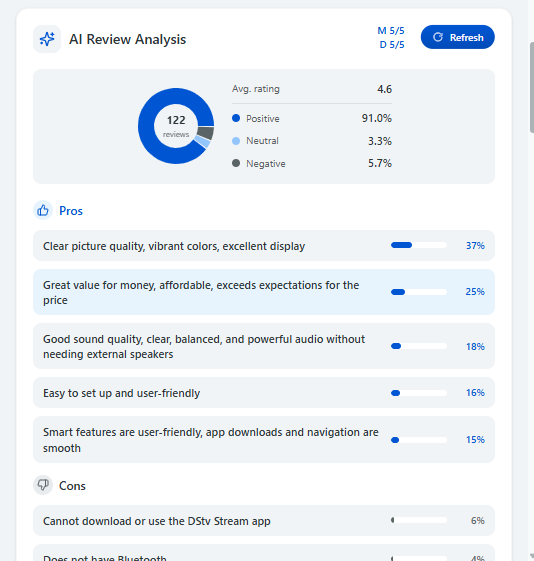
AI review snapshot
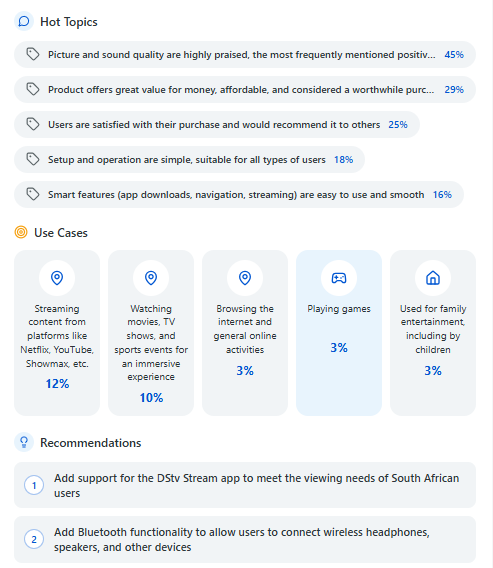
Themes & suggestions
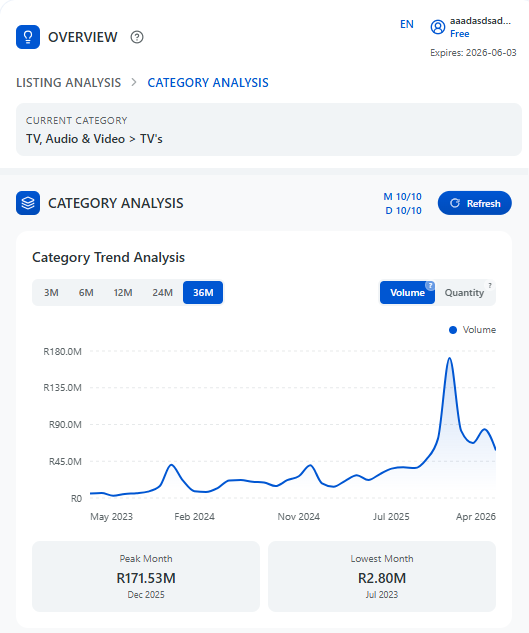
Category trend
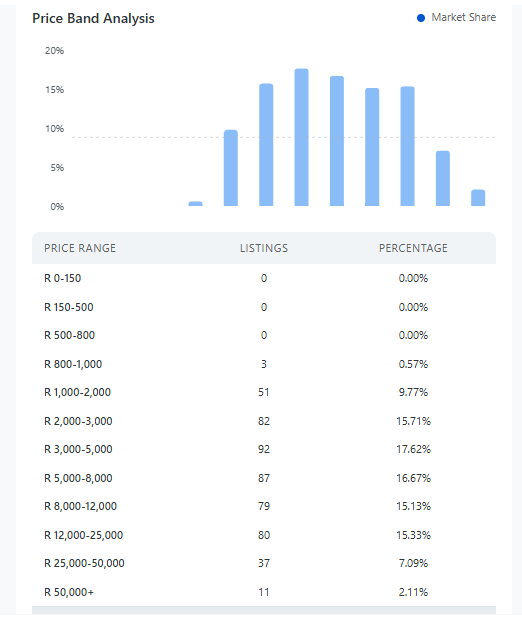
Price bands
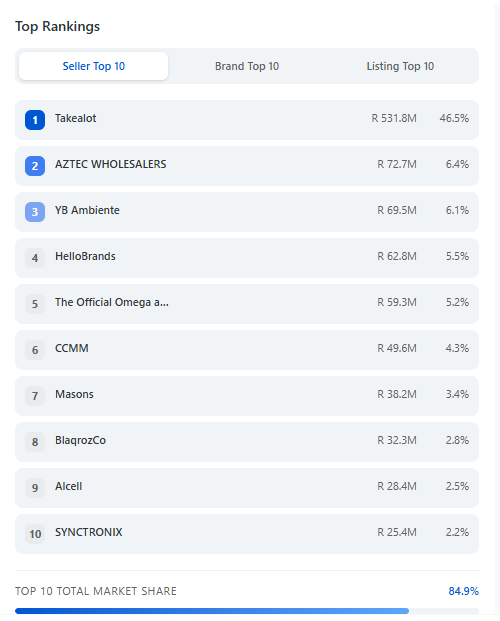
Top rankings
Video guides
See how to use INSYDOR to analyze listings, explore categories, understand reviews, and make product decisions on Takealot.
Flexible Plans
Start free. Upgrade when you need more insights.
Why sign in?
Sign in once to start free, keep your usage synced, and access AI-powered insights.
Signed in
- Free starter usage
Try the core modules with included usage after sign-in.
- Synced plan & usage
Keep your plan and available usage synced wherever you use the extension.
- AI review access
Use AI-powered review insights with your included usage.
Guest
- Browse the site
View only product, pricing, and policy pages without an account.
- Install the extension
You can install INSYDOR as a guest, but analytics require sign-in.
- Full analytics require sign-in
Sign in to run listing, category, and AI review analysis.
How it works
Three steps to your first insight
Install the extension
Add INSYDOR to your browser from the extension store.
Sign in to start free
Create or access your account to unlock included usage.
Browse Takealot and run analysis
Open a product or category page, then run listing, AI review, or category insights.
Trust & support
Transparent usage
Your plan and usage are visible, so you always know what is available.
Clear policies
Privacy and terms are written to be clear, practical, and easy to review.
Human support
Reach us at support@insydor.com — we reply as quickly as we can.
FAQ
It helps you review sales trends, category performance, and AI review insights so you can judge product, follow-sell, and stocking opportunities.
No. After installing the extension, you can view insights inside the Takealot product or category page you are already browsing.
INSYDOR currently supports Takealot product detail pages and category pages. Product pages support listing analytics and AI review insights; category pages support category analytics.
INSYDOR currently supports Takealot. More marketplaces will be considered based on seller needs.
You can browse the website and install the extension. Running listing analytics, AI review insights, and category analytics requires sign-in.
Yes. Start with one product or category to understand demand trends, buyer feedback, and competition before making a decision.
Still have questions?
Reach us at support@insydor.com
Start with INSYDOR
Sign in for free usage and run analytics without leaving Takealot.